Add-ons on one item
Attach optional or required paid extras from your catalog to this item's booking.
Where to find it
Fleet → open an item → Add-ons & Maintenance tab
Add-ons are paid extras a customer can attach to a booking — a helmet, extra fuel, insurance. This tab controls which of your business's add-ons are available on this particular item, and whether each is optional or required.
Where to find it
Fleet → open an item → Add-ons & Maintenance tab (step 5 of 6).
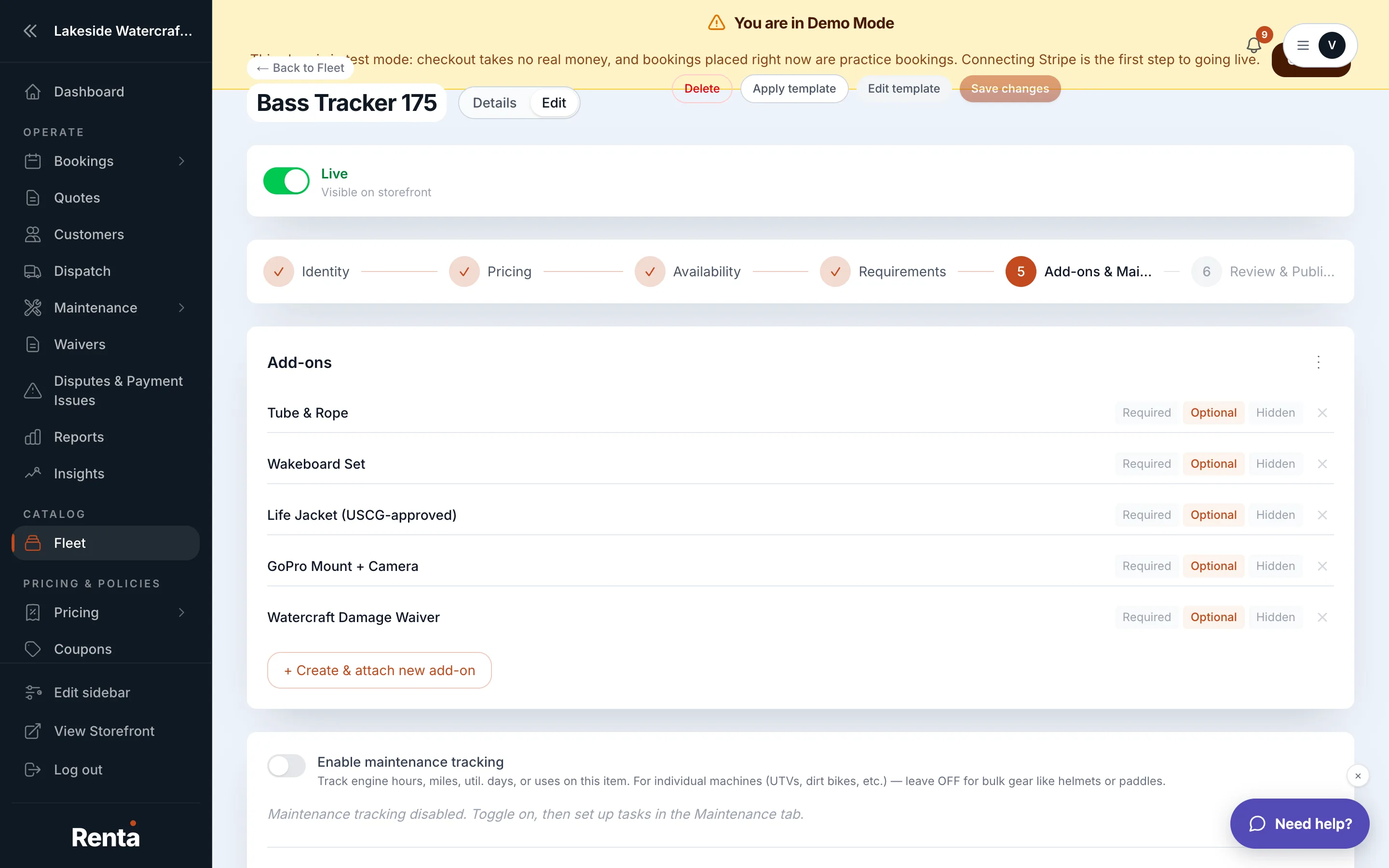 Add-ons section on the Add-ons & Maintenance tab
How it works
- Add-ons section — add rows for add-ons from your business's shared add-on catalog. None attached by default.
- For each row:
- Add-on Name — pick from your existing add-ons.
- Mode — Required (added automatically), Optional (customer can choose it), or Hidden (not shown for this item, even though it exists in your catalog). Optional by default.
Example
If your catalog has a "Life Jacket Rental" add-on, you could set it to Required on a jet ski item (every renter needs one) but Hidden on a paddleboard item that already includes one.
Good to know
- This tab attaches add-ons that already exist in your catalog — it doesn't create new ones. Add-ons are created and priced at the business level, then linked to items here.
- Add-on pricing feeds into the total price the customer pays — see How a price is calculated.
Related
Still stuck? Ask the chat.