Finding and sorting customers
Search your customer list by name, filter by tag, and sort by spend, bookings, or last visit.
Where to find it
Customers
The Customers page lists every person who has ever booked with you (or been added manually). You can search, filter by tag, and sort the list to find someone quickly.
Where to find it
Customers
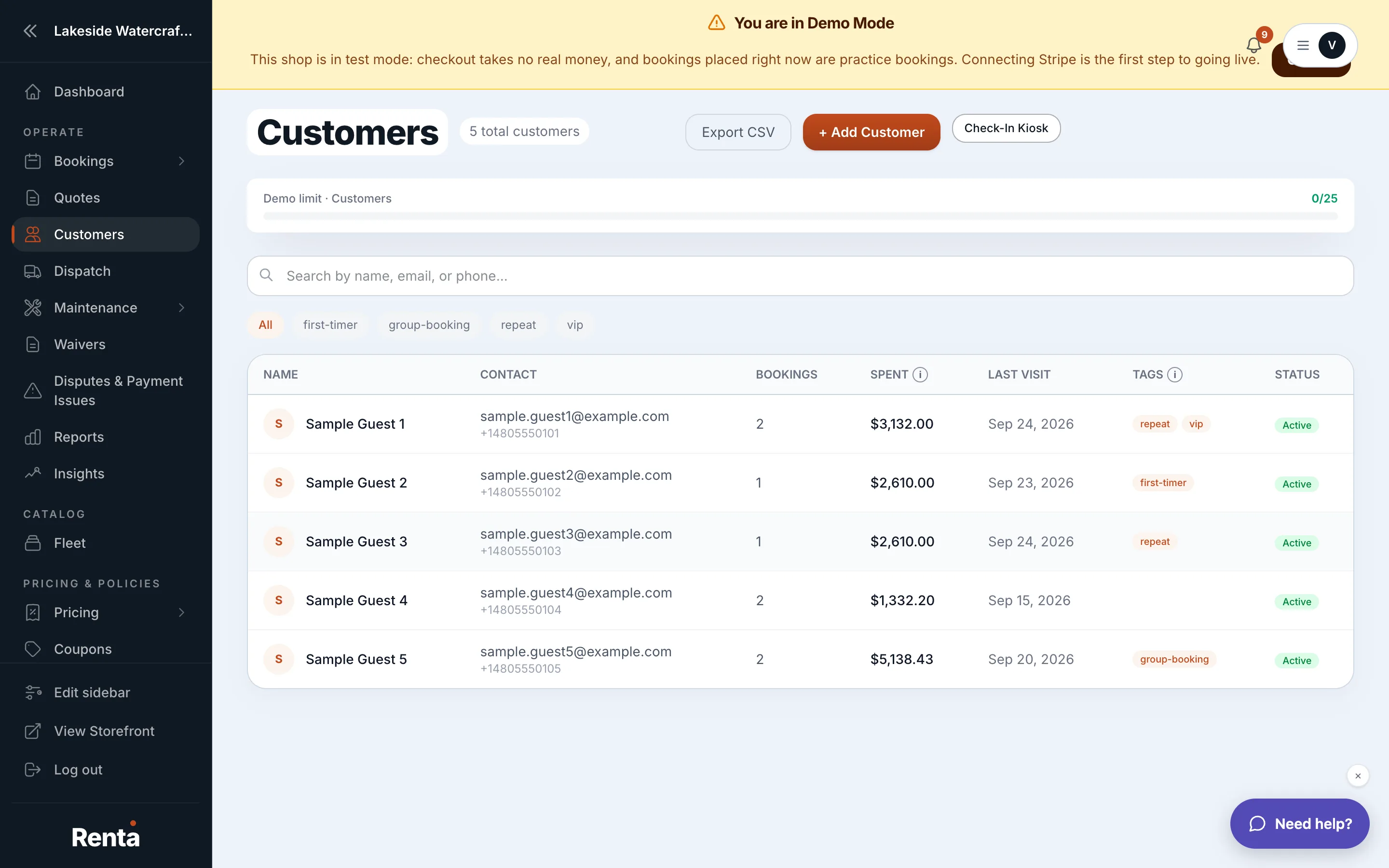 The Customers list with the search box, tag filter, and sortable columns
How it works
- Search box — searches by name using a fuzzy match, so a close spelling still finds the right person.
- Tags filter — shows only customers with a tag you pick, like "VIP" or "Repeat." Tags are ones you create yourself on a customer's profile.
- Sort by Name — alphabetical, toggles A-Z / Z-A.
- Sort by Spent — total lifetime spend, highest first by default.
- Sort by Total Bookings — most bookings first by default.
- Sort by Last Visit — most recent pickup date first by default.
- Sort by Created At — newest customer record first by default.
- Status badge — shows whether a customer is Active, VIP, or Banned.
Example
If you want to see who has spent the most with you this year, click the Spent column header to sort high to low, then scan the top of the list.
Good to know
Tags shown here are internal — customers never see them. Read more about a customer's full record on A customer's full profile.
Related
Still stuck? Ask the chat.