Adding a discount or an extra charge to a booking
Knock money off a booking with a discount, or bill for something extra with a custom charge.
Where to find it
Bookings → open a booking → Actions menu (More) → Apply discount / Charge custom amount
Two separate tools let you adjust a booking's total after it's already been created: a discount, which lowers the price, and a custom charge, which adds a new charge for something like a cleaning fee or extra gear.
Where to find it
Bookings → open a booking → Actions (More) menu → Apply discount or Charge custom amount.
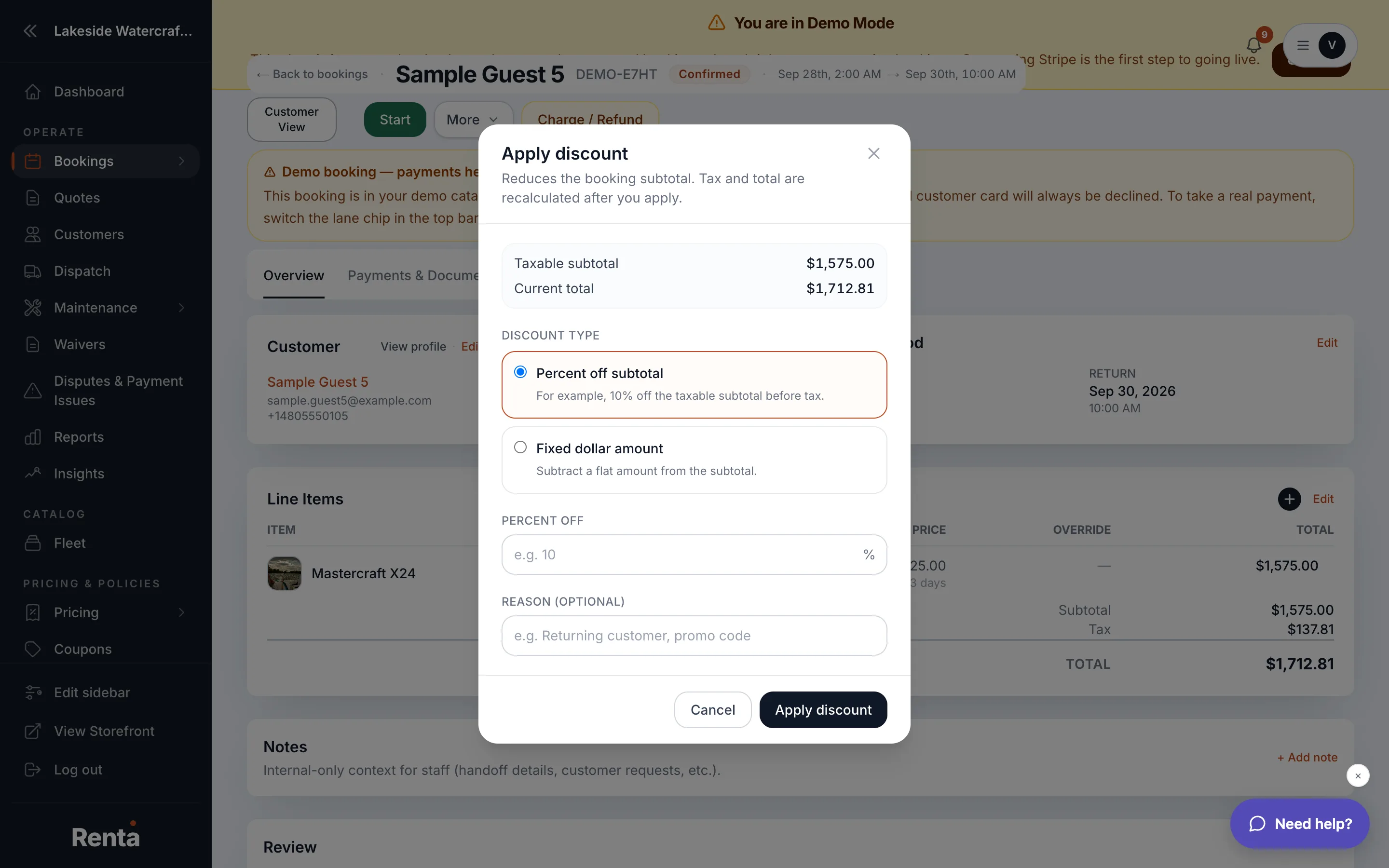 The Apply discount and Charge custom amount modals
How it works
- Apply discount — enter a dollar amount and an optional reason. The amount is subtracted from the rental line before tax.
- Charge custom amount — enter a dollar amount, a description (so the customer knows what it's for), and whether the charge should have tax applied. This adds a brand-new charge to the booking.
Example
A customer damages a strap on a paddleboard that isn't worth withholding the full deposit for — use Charge custom amount with a description like "Strap replacement" and the repair cost, rather than processing it as a discount or refund.
Good to know
- Both actions are logged in the booking's change log, so there's always a record of who applied what and why.
- These are for the rental price itself — pulling money from a held deposit instead is a separate action, see Releasing vs. capturing a deposit hold.
Related
Still stuck? Ask the chat.